Public voting is currently closed.
Overview
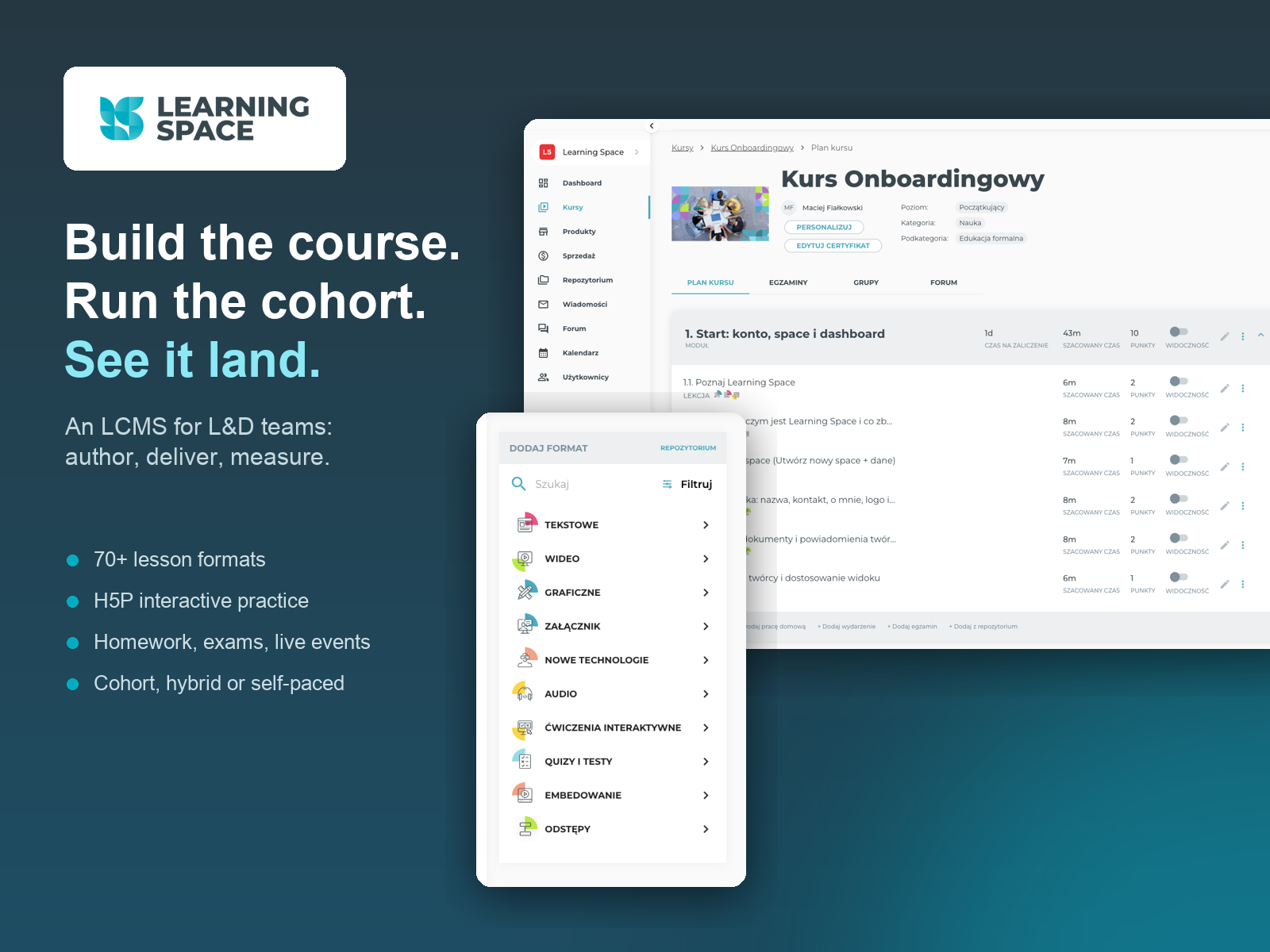
An LCMS with two interfaces: authors build lessons from 70+ block formats with H5P practice, homework, exams and live classes; learners get one focused surface. The same course runs as cohort, hybrid or self-paced.
Project Details
Category
Web & Desktop App
Customer
-
Submitted by
Timeframe
Jun 2025 - Jun 2026
Tech Stack
React SPA, GraphQL API on PHP/Symfony, H5P for interactive practice, BigBlueButton for live classes, Stripe and PayU on each creator's own keys, OVHcloud hosting.
Services
Our own product, end to end: product strategy, UX and UI design of both the authoring and the learning interface, instructional design, frontend and backend engineering, and running the platform in production.
Demo Link
Team
In-house team, no external agency: product direction, UX and UI design, instructional design, project management, backend and frontend engineering. The people who design the interface also build it and support it in production.
Link to case study
-
Description
The initial problem. Two interfaces fail in this category, and they fail differently. On the authoring side, course tools treat a lesson as a page: a text editor with a video embedded, which looks fine until the third revision, when the page has to be rebuilt from scratch. On the learner side, a course is a list of videos with a quiz at the end — nowhere to practise, and no way for the organisation to tell whether anything landed. Teams end up choosing between a generic LMS that cannot host real practice and a custom build they cannot maintain.
The plan. Three commitments, set before the first screen was designed. A lesson is an addressable sequence of blocks, not a page. The same course must run as a cohort, hybrid, self-paced or linear programme without forking the product. And every authoring surface must have a learner preview one click away, because authors stop caring about the learner view the moment it is hard to reach.
Innovativeness — the block model. Each lesson is assembled from atoms: text, image, full-screen walkthrough, video, audio, attachment, checklist, interactive H5P exercise. Over 70 lesson formats sit in one categorised palette; blocks are reordered by drag and drop, saved to a shared repository and reused across courses. Because a block is addressable, a lesson survives revision — you replace an atom instead of rebuilding a page. The same addressability is exposed through our GraphQL API, so an existing training library can be migrated programmatically instead of retyped.
Execution — the authoring interface. The course plan is the working surface: modules, lessons, homework, exams and live events in one list, each with its time estimate, points and visibility, all editable in place. Publishing, previewing as a learner, personalising the space and editing the certificate sit on the same screen. Around it: groups, learning paths and cohorts; offers with access windows, discount codes and sales links; per-learner statistics; a forum and a messenger; and a course-plan recommender that drafts a programme structure in a few clicks.
Execution — the learner interface. One reading surface, content and practice in the same flow, the course plan a click away in a side drawer, points and progress always visible, and pagination that tells the learner exactly where they are. Deadlines are expressed either as calendar dates or as days from the learner's own start, which is what lets one product serve a fixed-date cohort and an always-open library at the same time.
No-code solutions. The platform itself is custom-built, but what it delivers is a no-code environment: an instructional designer with no engineering support assembles interactive lessons, exams and live classes, publishes them under their own brand and starts selling, without writing a line of code.
Tools and frameworks. React single-page app, GraphQL API on PHP/Symfony, native H5P for interactive practice, BigBlueButton for live classes, Stripe or PayU running on each creator's own keys, hosted on OVHcloud.
Our role in the process. This is our own product, designed, built and run in-house — no external agency at any stage. We are also our own hardest user: our onboarding academy of 7 modules, 27 lessons and a situational exam is authored in the same editor we ship, and every rough edge we hit while building it goes straight into the backlog. Instructional design sits inside the product team, not next to it.
Duration of the process. A twelve-month release cycle, June 2025 to June 2026, run in two-week sprints with separate tracks for new features, client-driven requests, planned bug fixes and technical debt, so product work and customer commitments never compete for the same slot.
Changes after implementation. One production space alone runs 10 published programmes with 723 course enrolments and 376 registered users, alongside 12 programmes in preparation. Organisations that used to hand their people a list of videos now run a branded academy with their own catalogue, groups and payments — the gateway runs on their keys, so the money and the invoices stay with them. Registration is free and open at learningspace.app, so any of this can be checked without a sales call.
Lessons learned. Page-shaped lessons do not survive revision; it took building a real 27-lesson course to prove the block model right. Interactive practice has to sit inside the lesson, because anything living in a separate tool does not get used. And a learner preview one click away changes what authors ship — the fastest way to find the gap between what a platform claims and what it does is to run your own academy on it.
Project Outcomes
In one production space alone: 10 published programmes and 12 in preparation, 723 course enrolments across them and 376 registered users.
What changed in the organisations using it. Each runs a branded academy instead of a shared folder of videos: its own space, catalogue, learner groups, offers and payments. Payment gateways run on the organisation's own Stripe or PayU keys, so sales, money and invoices stay with them rather than with us. Access is granted per offer with start and end dates, so a closed corporate programme and an open self-paced library live side by side in one space.
On the authoring side the change is revision cost: a lesson is edited by replacing atoms instead of rebuilding a page, and materials are reused from a shared repository across courses. Our own reference programme — 7 modules, 27 lessons and a situational exam — was authored entirely in the editor and used to validate the flow end to end before customers saw it.
On the learner side, practice sits inside the lesson through native H5P rather than a quiz bolted to the end, and per-learner statistics give a programme owner something to look at other than a completion percentage.
Target Audience
The product has two distinct end users, and both were treated as first-class interfaces.
The author — an instructional designer, trainer or subject-matter expert, usually with no engineering support — works in the course plan and the block editor: assembling lessons from atoms, setting time estimates, points and visibility, adding homework, exams and live classes, publishing, and then watching how learners actually move through the material.
The learner — an employee in onboarding, a participant in a paid cohort, a student in a formal programme — works in a single reading surface: content and interactive practice in one flow, the course plan one click away, progress and points visible, deadlines counted from their own start date rather than one shared calendar.
Organisationally that means training companies, HR and L&D teams running onboarding and internal academies, independent experts selling their own courses, and institutions running formal education.
Why Us
Two interfaces, one standard: an authoring surface where a lesson is an addressable sequence of blocks, and a learner surface where practice sits next to the content. Designed, built and used daily by the same in-house team.
https://learningspace.app/
Explore More
Previous Editions
Category
Web & Desktop App